
SuperShot - Screenshot Editor is a Productivity app for iPhone / iPad / Mac by 耀 陈. As of Sep 25, 2026, deal type: Paid → Free. SuperShot - Screenshot Editor has been on a deal once on GroveTab, on Sep 24, 2026.

- Developer
- 耀 陈
- Category
- Productivity
- Platforms
- iPhone, iPad, Mac
- Requires
- iPhone 18.0+
- Rating
- 3.7 ★ (3)
- Added
- Sep 24, 2026
About this app
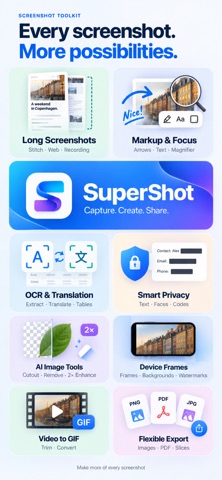
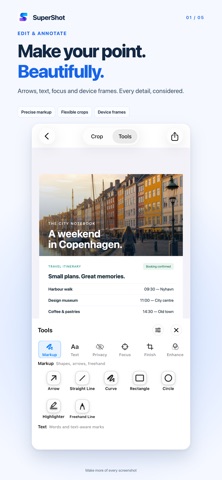
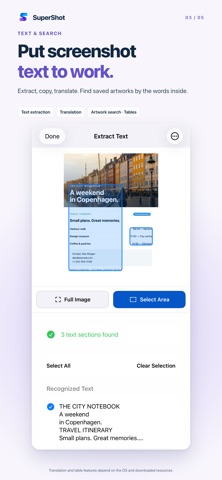
Make screenshots easier to explain and share. SuperShot brings screenshot editing, long-image stitching and image tools to iPhone and iPad. Save a conversation, collect web references, explain a process or cover personal details before sharing. DEVICE FRAMES Give screenshots and long images a device frame. New options include iPhone 18 Pro / Pro Max, iPad Pro M5 (11″ / 13″), Apple Watch Ultra 4, Apple Watch Series 12. Explore 17 new color variants and choose models by year. KEEP THE WHOLE STORY Stitch screenshots vertically or horizontally with automatic overlap detection and manual seam adjustment. Turn a selected part of a scrolling screen recording into a long image, or export a video clip as a GIF. Save full webpages with the Safari extension and continue editing. SHOW WHAT MATTERS Add arrows, text, shapes, freehand marks, highlights and step numbers. Magnify small details, focus attention with a spotlight, and finish with cropping, watermarks or device frames. PUT IMAGE TEXT TO WORK Recognize text across an image or within a selected area. Choose paragraphs to copy, share or export, translate recognized text, and export recognized tables as CSV or TSV. REVIEW BEFORE SHAR
Deal history
SuperShot - Screenshot Editor has been on a deal once on GroveTab, on Sep 24, 2026.
- Paid → Free –
Prices can change at any time. Check the price on the App Store before you download.


